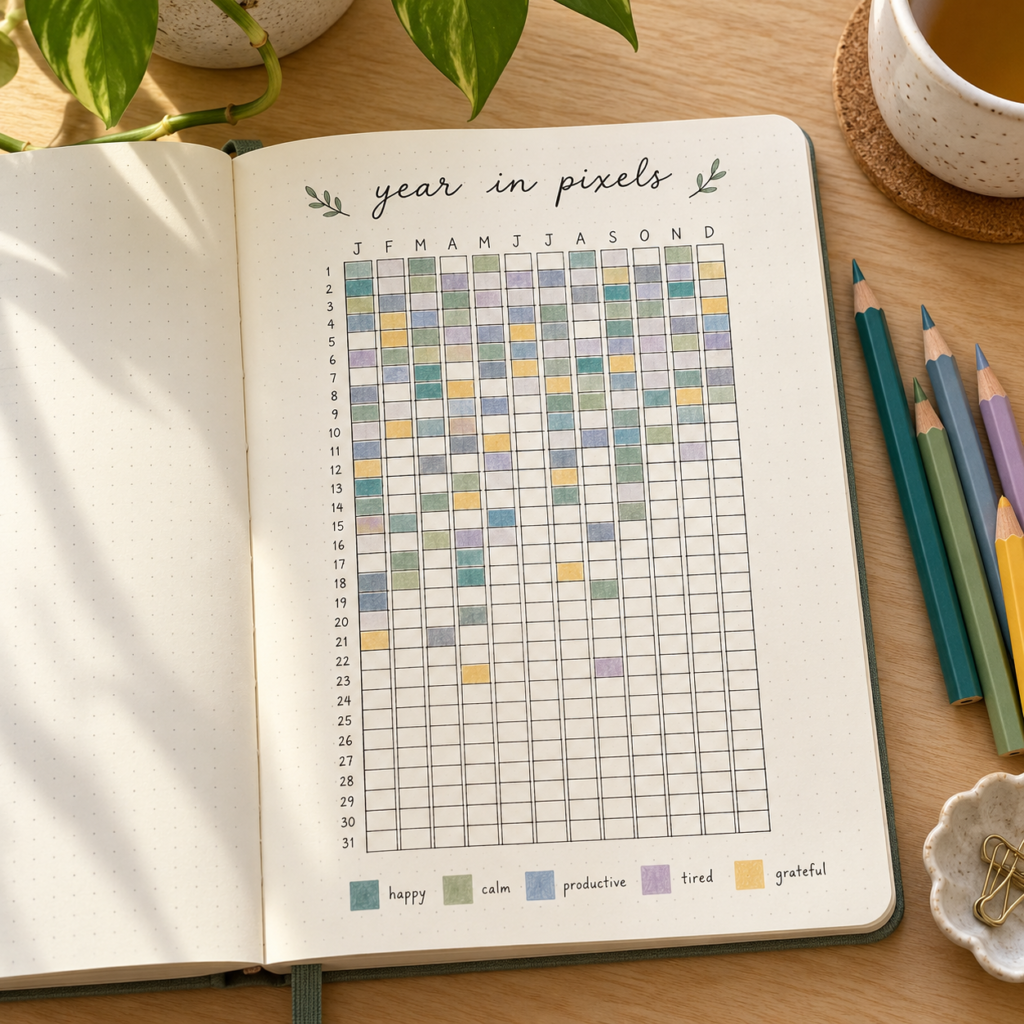
A year can feel like a blur when you try to remember it all at once. A bullet journal year in pixels gives you a small, visual way to keep track: one square, one color, one day at a time.
You can use it for moods, reading, time outdoors, or another part of everyday life you want to notice. Here is how to set one up, choose a useful color key, and keep it simple enough to return to. There is also a free Year in Pixels printable if you would rather skip drawing the grid.
What is a year in pixels?
A year in pixels is a calendar-style tracker made from small squares. Each square represents one day, and its color or symbol records whatever you have chosen to track. As you fill it in, the individual squares become a picture of your year.
A common layout has 12 columns for the months and 31 rows for the days. You can rotate that layout to fit your journal. Cross out the dates that do not exist in each month, and check February against the calendar for the year you are using.
Why use one in your bullet journal?
The appeal is its small scale. You do not need to write a full journal entry to leave a record of your day. A single mark can be enough.
Looking back may help you spot patterns or remember stretches of your year that would otherwise blend together. Treat those patterns as a starting point for reflection, though: a colored square cannot explain everything that happened that day.
Your tracker does not need to measure progress. It can simply be a place to notice your life.
How to make a bullet journal year in pixels
1. Choose one thing to track
Give each grid one clear purpose. Mood is a popular option, but you could also track whether you read, how much time you spent on a hobby, or whether you went outside.
If you want to track several things, use separate grids. Trying to fit mood, sleep, exercise, and reading into the same square can make a quick daily habit feel complicated.
2. Draw and label your grid
Make 12 month columns and 31 day rows, then add the month names and day numbers. Mark the unused squares so you will not accidentally fill in April 31. Leave room beside or below the grid for your key.
Use the space your notebook allows. Your squares only need to be large enough for a small patch of color or a readable symbol.
3. Make a small, forgiving key
Start with four to six options you can tell apart easily. For a mood tracker, your key might include:
- Yellow: joyful or energized
- Green: calm or content
- Blue: low or sad
- Purple: overwhelmed or tense
- Gray: mixed or hard to describe
These are just example labels. Choose words that feel natural to you, and decide whether your square represents your overall day or how you feel at a particular check-in time. A mixed option leaves room for days that do not fit one neat category.
You can use letters, dots, or patterns instead of colors. Write those symbols in your key, too, so the tracker stays readable without a specific set of pens.
4. Fill in one square a day
Pair your check-in with something you already do, such as opening your planner in the evening. Make your mark and, if you want more context, add a few words on your daily page.
If you miss a day and do not remember it clearly, leave it blank or use a symbol for “not recorded.” You do not have to reconstruct a week from memory to keep using the tracker.
Other year in pixels ideas
If mood tracking does not appeal to you, try a more concrete question:
- Reading: no reading, 1–15 minutes, 16–30 minutes, or more than 30 minutes.
- Creative time: did you spend time making something today?
- Time outdoors: use a few time ranges that fit your routine.
- A daily highlight: choose a color for the kind of moment you want to remember, such as connection, rest, learning, or play.
Choose something you are curious about, rather than something you feel obliged to monitor. Keep a personal tracker somewhere you are comfortable recording that information.
Can you start halfway through the year?
Yes. You can start today and leave earlier dates blank. You can also label a rolling 12-month grid beginning with the current month, or try a single month before committing to a full year.
The empty squares are not a problem to solve. They simply show where your record begins.
Download the free Year in Pixels printable
If you would like a ready-made grid, the free Wellella Year in Pixels printable includes PDFs in Personal and Pocket planner sizes. The files are available to download directly from the page, with no checkout or email signup required. The A5 version is not included in this set.
Choose your size, print your page, and add a color or symbol key that suits what you want to track.
Let your tracker change with you
At the end of a month, ask yourself: What do I notice? What do I want to remember? Is this still useful to me?
You can simplify the key, choose a different focus, or stop using the grid. A year in pixels should fit your life as it is. One small square is an invitation to pay attention, not another thing to get right.